Cheesebunker V2
Cheesebunker - V2
Step 1: Spoofing 🖥️
- Download Loader HERE
- If its your first time using press "Register" otherwise "Login" and continue
- Go to Cleaner page and press "Start Cleaning" (IS NEEDED OTHERWISE SPOOF BUTTON DOESNT WORK)
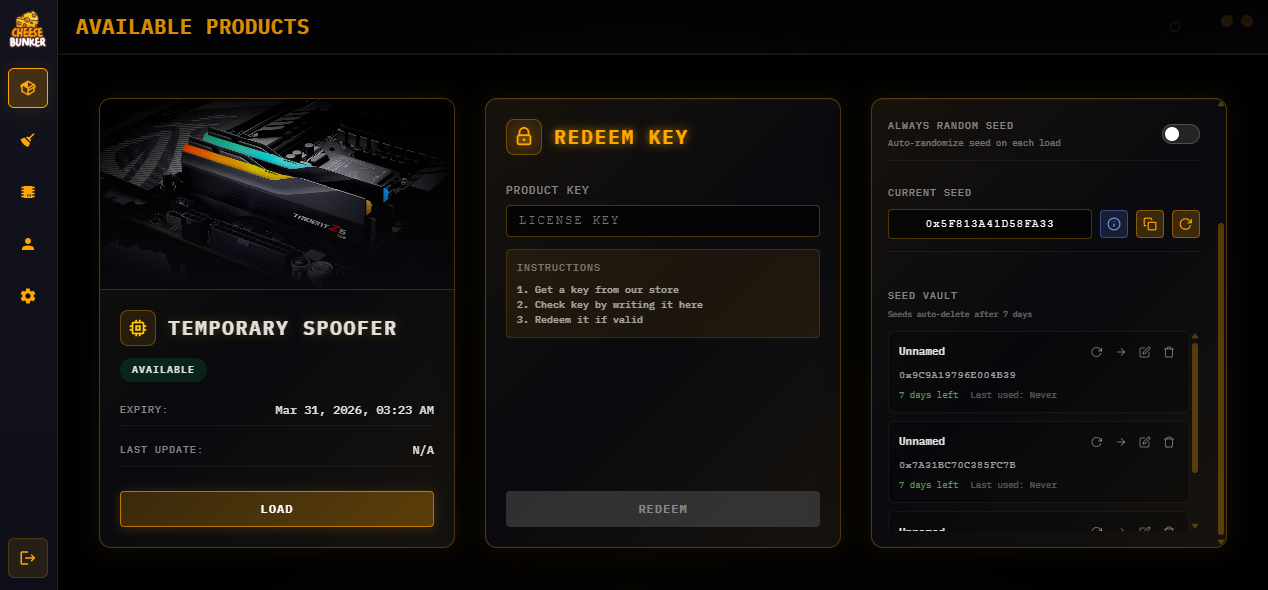
- Go to products page and press "Load" to start your Spoofer
- When getting success you are ready to go!
Cleaning Instructions
- Click the Clean button, even if your operating system is fresh. This will clean and spoof certain components of your operating system
- Once cleaning is complete please head over to the spoof button here all you would need to do is hit spoof and wait.
- The first time you run our spoofer it'll prompt you to restart as it needs to setup all the dependencies needed.
- Login to the spoofer and click the spoof button, once it has prompted to be fully spoofed and the loader closes you can compare your serials in a HWID Checker.
- If everything is changed your good to go and play your favourite EAC / BE game.
Trouble Shooting
- Product / Spoofer ban.\
- If a file says "you are banned", anti-crack was triggered
- Close any prohibited tools before launching
- Common blocked tools include:
- HTTPDebugger
- x64dbg / x32dbg
- HxD
- dnSpy
- Fiddler Everywhere
- CosmoSupportTool
- ProcessHacker
- If you believe this is a false ban → contact support
\
- BSOD (Blue Screen) fixes.\
- Update ALL drivers (including GPU)
- Disable TPM in BIOS
- Disable Fast Startup in BIOS
- Disable Hyper-V
- Enable Virtualization (VT-x / SVM) in BIOS
- Uninstall ALL VPN clients
- Open CMD as ADMIN and run:
sfc /scannow
DISM /Online /Cleanup-Image /RestoreHealth - Restart PC and retry
- If not fixed → clean Windows reinstall (delete all partitions)
\
- Spoofer not working.\
- Disconnect from any VPN or proxy
\
- Disconnect from any VPN or proxy
- How to find DMP file.\
- Open File Explorer (Win + E)
- Go to: C:\Windows\Minidump
- Locate .dmp files
\
- If Minidump folder missing.\
- Press Win + R → type: sysdm.cpl
- Go to Advanced → Startup and Recovery → Settings
- Set "Write debugging information" to:
- Automatic memory dump OR Small memory dump (256 KB)
- Ensure path is: %SystemRoot%\Minidump
- Apply and restart PC
\
- Still cannot find DMP.\
- Open File Explorer
- Enable View → Show → Hidden items
- Check C:\Windows\Minidump again
\
- Sending DMP to support.\
- Run Discord as ADMIN
- Create a support ticket
- Attach .dmp file
- Include details:
- When BSOD happens (spoof / startup / in-game)
- Your Windows version (winver)