🤖 Rocket League AI Tool (Cheesy) – Setup, Performance & Guide (2026)
Rocket League is one of the most skill-based games out there.
From aerial control to advanced mechanics, reaching high ranks like GC or SSL usually takes hundreds—if not thousands—of hours.
That’s where modern AI-assisted tools come in.
In this guide, we’ll cover:
- What the Rocket League AI tool is
- How to set it up correctly
- Performance expectations
- Best practices for smooth operation
🎮 What Is the Rocket League AI Tool?
The Rocket League AI tool (Cheesy) is designed to assist gameplay by:
- Improving consistency
- Executing advanced mechanics
- Maintaining strong positioning
- Reacting quickly to in-game situations
👉 The goal is smoother, more optimized gameplay.
🚀 Preview
🎥 Watch it in action:
https://www.youtube.com/watch?v=s6llcUnW-H0
⚙️ How to Set Up (In-Game Requirements)
For everything to run correctly, your setup matters.
✔️ Basic Setup
- Press F8 to open the loader
- Do NOT use fullscreen (use borderless/windowed)
🎯 Required Settings
Make sure your in-game settings match:
- FPS capped to 120 FPS
- Steering Sensitivity: 1.00
- Aerial Sensitivity: 1.00
- Controller Deadzone: 0.00
- Dodge Deadzone: 0.50
- Mouse Sensitivity: 1.00
- Keyboard Input Acceleration: 0.00
👉 These ensure stable and predictable behavior.
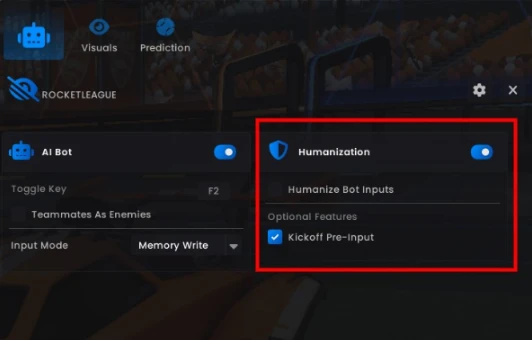
🧠 Humanization Settings (Important)
The tool includes a Humanization system designed to simulate natural input patterns.
✔️ For Balanced Gameplay:
- Keep Humanization enabled
⚡ For Testing Performance:
You can disable:
- Kickoff Pre-Input
- Other Humanization options
👉 This may increase performance, but reduces natural behavior.
📊 Performance Expectations
Performance varies depending on configuration:
- With Humanization ON → High-level competitive play
- With optimized setup → Even stronger consistency
👉 Results depend heavily on your setup and environment.
🛠️ Best Practices for Stability
To ensure smooth performance:
- Configure settings in the main menu only
- Avoid changing settings mid-session
- Stay active while using the tool
- Keep your system stable and consistent
👉 Consistency is key for smooth operation.
⚠️ Important Notes
- Sudden changes in behavior or setup can cause instability
- Fresh accounts or inconsistent setups may behave differently
- Always test configurations before regular use
👉 Use responsibly and understand how your setup behaves.
🔗 Useful Links
👉 Product Page:
https://cheesebunker.gg/product/rocket-league-cheesy
👉 Full Setup Guide:
https://cheeseguides.com/guides/rocket-league/cheesy
🧀 Final Thoughts
AI tools are changing how players interact with competitive games.
With the right setup and configuration, you can achieve:
- More consistent gameplay
- Better mechanical execution
- Improved overall performance
But like any advanced tool, results depend on how you configure and use it.
Published at May 04, 2026